
Platform MCP quickstart
Connect an MCP client to Yodu and safely inspect one workspace through named tools.
Yodu's Platform MCP server uses stateless Streamable HTTP at:
https://app.yodu.ai/api/mcp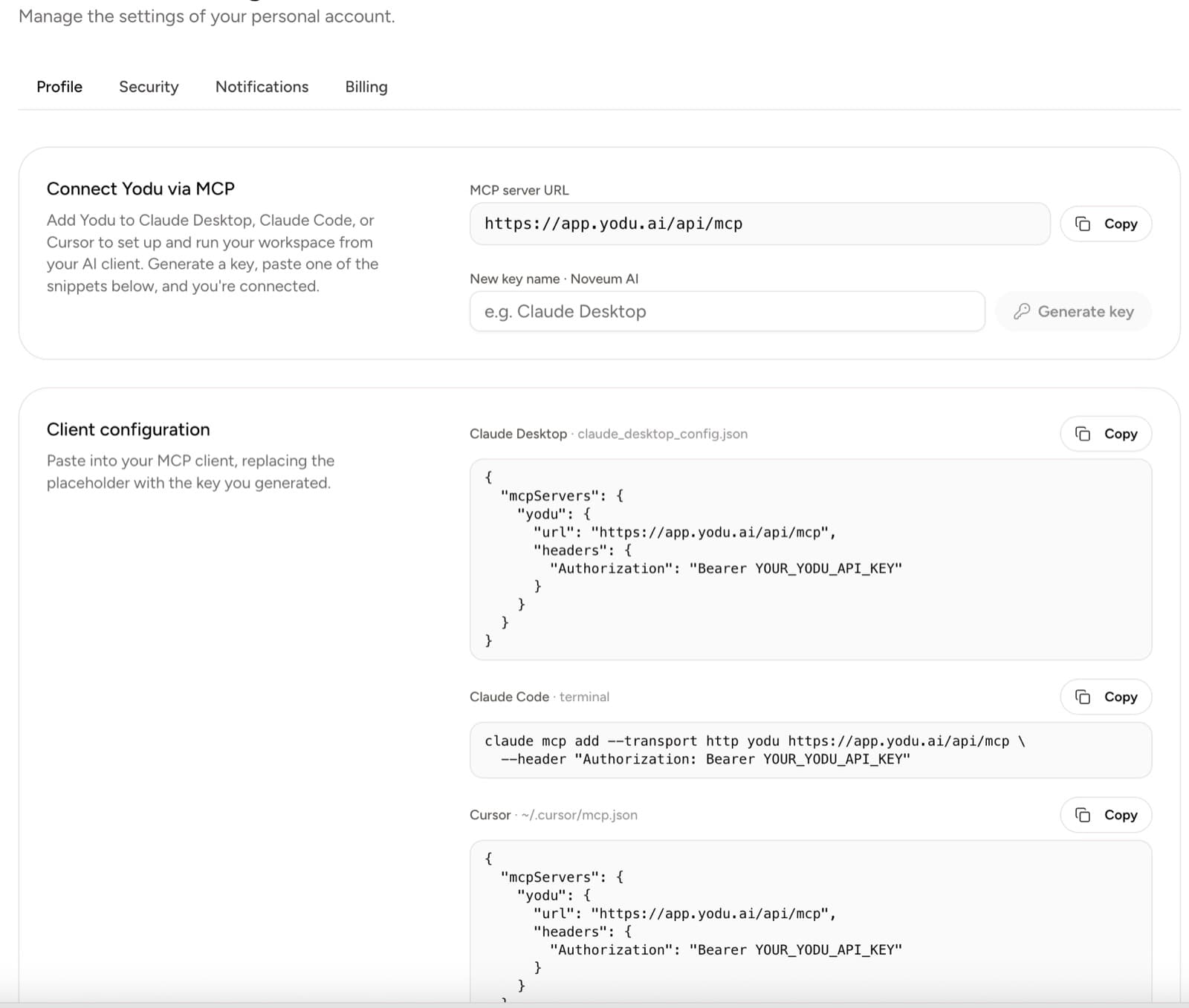
Guided company setup with Claude or the website
The website and Platform MCP use the same saved draft, approved company brief, revisions and original first task. Claude is an optional guide; the complete website flow remains available. Start with get_onboarding_guide and confirm its workspace identity before changing anything.
For Claude's native remote connector, open Customize → Connectors, add a custom connector with https://app.yodu.ai/api/mcp/oauth, then sign in to Yodu and choose the authorized workspaces and scopes. Availability depends on your Claude plan and organization settings. Do not put remote OAuth JSON into claude_desktop_config.json.
For Claude Code OAuth:
claude mcp add --transport http yodu https://app.yodu.ai/api/mcp/oauthThen use /mcp in Claude Code to authenticate. A cloud connector needs a publicly reachable HTTPS endpoint. 127.0.0.1 and localhost can be reached by a local CLI only. See the official Claude custom connector instructions and Claude Code MCP instructions.
The external Claude connection authorizes Yodu tools. Employees need a separate model connection through the secure website form; one Claude subscription or ChatGPT/Codex subscription is sufficient. During runtime recovery, stored direct OpenAI, Anthropic and OpenRouter API keys do not make an employee runnable. The model step is available before a company brief. Never paste model credentials into chat or try to read stored secrets. Choose the first specialist intentionally; Chief of Staff remains the sole lead. Sales, SEO and source-draft work do not require developer accounts unless the selected job requests those capabilities.
Reads require workspace:read and a current owner/admin role. Onboarding mutations require both workspace:read and workspace:write, plus their live operation role. Preparation and cancellation remain owner-only. prepare_onboarding requires explicit consent: true for the agreed job; hosted preview needs separate consent to restrict the selected MCP connections. Reads never start preparation. Saved credentials, queue delivery and observed model output are separate facts, none of which constitutes final result acceptance.
Use the guide's secure website review link for independent HUMAN acceptance. There is no MCP acceptance tool. An OAuth workspace switch takes effect on the next HTTP request, with membership and billing checked again. Every operation already admitted in the current request, including concurrent batch peers, retains that request's workspace; subsequent scoped calls on the same server reject after a different workspace is selected.
Continue work after onboarding
get_onboarding_guide reports completed, requiresSetup, needsTaskRecovery and a mode. Completion means the original first task is still DONE and has its exact saved human acceptance. The ordinary website setup entry then returns to the workspace dashboard; an explicit result link remains available as history. Future jobs use the existing Chief of Staff, normal tasks and their own review and approval rules. A later missing model credential opens workspace model settings rather than restarting company setup.
An accepted original task that is reopened or unavailable returns mode: "task-recovery", completed: false and requiresSetup: false. Follow the original task link and inspect its normal review workflow. Do not recreate the team, change the first job's immutable scope or repeat onboarding acceptance. Existing workspaces with a runtime and no saved guided setup remain operational without manufacturing a new first task or acceptance record.
The server exposes these onboarding tools:
| Step | Tools | Boundary |
|---|---|---|
| Inspect progress | get_onboarding_status, get_onboarding_guide | Reads do not start work; guide links describe secure handoffs and ongoing work. |
| Describe the company and first job | get_onboarding_draft, save_onboarding_draft, save_onboarding_brief | Use current draft versions and approved revisions; saved partial edits are not preparation consent. |
| Select only required accounts | get_onboarding_accounts, get_onboarding_vercel_resources, verify_onboarding_account_resource | Provider sign-in uses its secure authorization flow; a resource read does not grant deployment or employee write permission. |
| Prepare the minimal team | prepare_onboarding, cancel_onboarding_preparation | Owner-only; preparation requires explicit consent and preserves the existing Chief of Staff. |
| Start or recover the original job | start_onboarding_first_job | Existing readiness and work grants apply; do not replay an uncertain delivery. |
| Review and accept | Guide's website result link | Independent HUMAN acceptance stays on the website. No MCP acceptance tool exists. |
Credential storage uses set_model_provider_key with secrets:write and owner/admin membership. The website and MCP share validation, ChatGPT auth normalization and a durable runtime apply intent. The return value contains metadata and apply status, never a stored credential. Prefer the secure website model connection form; do not paste secrets into chat. A successful save still does not prove an actual model response or a completed job.
If your client exposes an older tool catalog without these onboarding tools, refresh or reconnect the Yodu connector and ask it to list tools again. A stale client catalog is not evidence that an onboarding step succeeded. Use the website handoff until the client actually advertises the required tools.
1. Create a client-specific key
Open Settings → MCP & API, create a key for the intended client, and copy it once. A key is bound to the active workspace and user.
2. Add the server
For Claude Code:
claude mcp add --transport http yodu https://app.yodu.ai/api/mcp \
  --header "Authorization: Bearer YOUR_YODU_API_KEY"
For JSON-based clients:
{
	"mcpServers": {
		"yodu": {
			"url": "https://app.yodu.ai/api/mcp",
			"headers": {
				"Authorization": "Bearer YOUR_YODU_API_KEY"
			}
		}
	}
}
See Client setup for client-specific locations and a generic connection checklist.
3. Start read-only
Ask the client to list the Yodu tools, then call get_workspace, get_workspace_overview, list_agents, and list_tasks. Use read_task for one selected item before changing board state; it includes discussion and safe linked approval/file metadata, but cannot decide an approval or read a file body.
Confirm the workspace name before any mutation. If it is wrong, revoke the key, switch workspace in Yodu, and create a new key.
4. Invoke writes deliberately
Use create_task or create_memory for a first bounded write. Existing tasks can be changed with update_task, ordered with move_task, and discussed with comment_task; those operations do not approve linked external actions. Employee configuration requires an owner or admin. Credential tools are guarded by secrets:write, are write-only, and never return the stored value. The current settings screen creates keys with all three scopes, so client-specific keys, current role checks, and deliberate tool approval remain important boundaries.
Review the complete Platform MCP tools and Scopes and security pages before using configuration or secret tools.