
Managed runtime and backups
Understand how Yodu provisions AI employee workspaces, reports runtime health, executes scheduled work, and records workspace backup evidence.
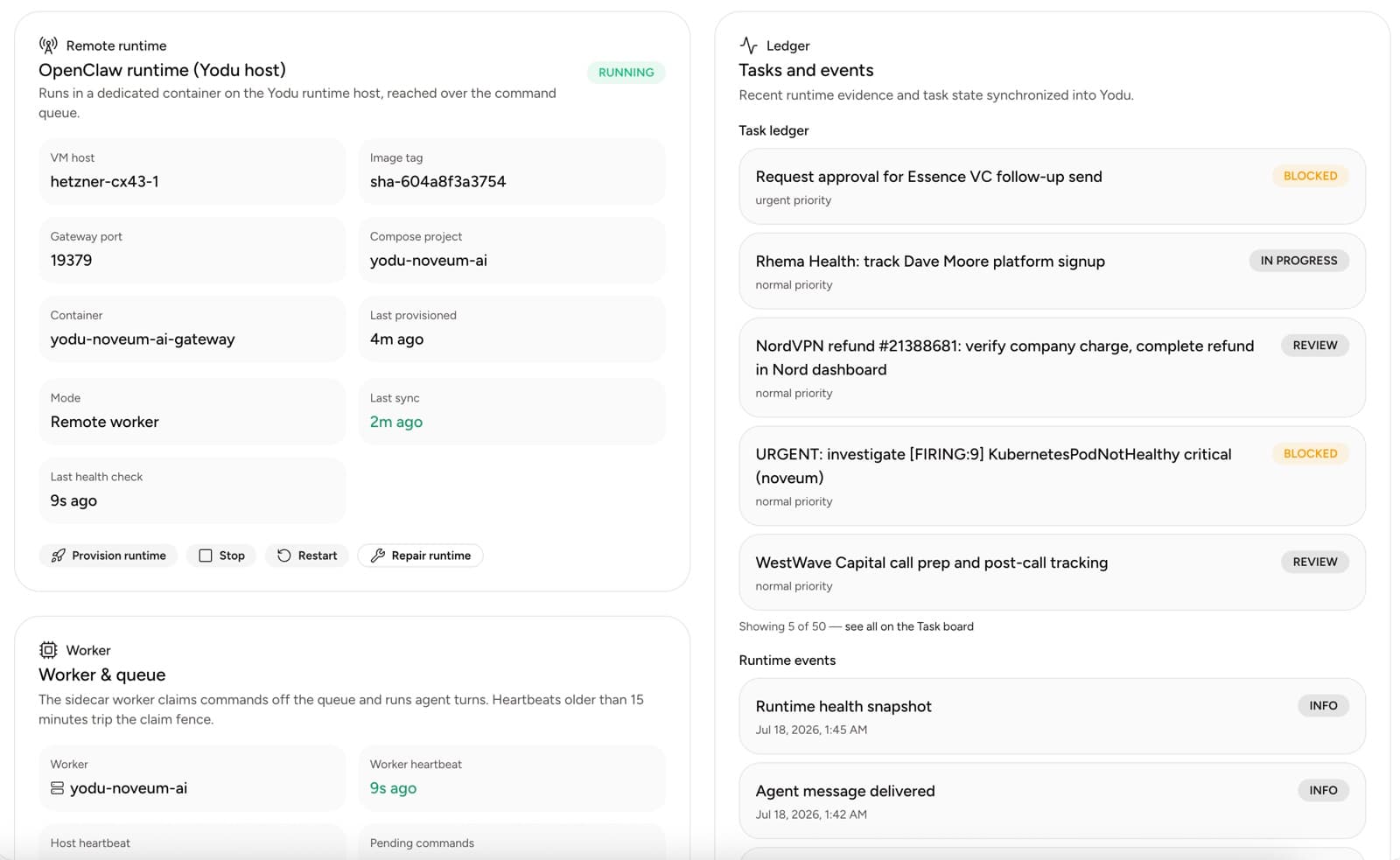
Yodu uses a control plane and a private runtime worker to execute AI employee work. The worker makes outbound requests to Yodu, claims bounded commands, runs them on the workspace runtime, and reports results and health back to the app. Raw runtime ports do not need to be public.
Open Runtime in a workspace to inspect container state, worker health, the command queue, recent runtime evidence, per-employee health, and backup freshness.
Provisioning an employee
When Yodu prepares an employee, the runtime receives the employee identity and active operating documents, including role, memory, tool, runtime, and schedule guidance. An active configuration change can trigger a new preparation step so future work uses the current policy.
Provisioning state is visible in the app. Do not treat an employee as ready only because its database status says active; confirm the workspace runtime and employee delivery health are current.
Runtime health
The Runtime page separates several signals:
- container and image state
- worker and host heartbeat age
- pending command count and recent claims
- last health check and file synchronization
- runtime events and task-ledger evidence
- per-employee reply and error state
These signals answer different questions. A healthy container does not prove that a model credential works, and a recent employee reply does not prove that backup state is current.
Scheduled work
Schedules run through the same managed runtime. Each job keeps an employee owner, cadence, timezone, last run, next run, and current state.
Test a new schedule on demand before relying on its cadence. Pause dependent schedules when model access, tool access, or runtime health is degraded.
Backups
Yodu schedules workspace backups and queues a fail-soft safety backup before stop, restart, and provision operations. The Runtime page shows:
- when the most recent recorded backup ran
- archive size
- recorded file count when available
- freshness status
- a Back up now control
Workspace archives cover the runtime workspace state, including employee configuration and workspace directories. Runtime gateway credentials are excluded from the archive. Provider and tool secrets remain encrypted references in Yodu rather than plaintext values copied into employee files.
Retention keeps recent daily archives and a smaller weekly set. When external object storage is configured by the operator, archives can also be copied there.
What backup status proves
A recent timestamp, non-zero archive, and recorded manifest show that a backup command produced an artifact with measurable contents. They do not by themselves prove that every file is correct or that a full recovery will meet a particular recovery-time objective.
The current operator checklist still requires a tested restore into a scratch location and a comparison against expected workspace state. Yodu does not claim point-in-time recovery or a guaranteed recovery objective in the product UI.
Operational checklist
Before high-risk runtime work:
- Confirm the employee has no critical turn in progress.
- Check worker and container health.
- Review the last backup age, size, and file count.
- Queue Back up now if the current archive is stale.
- Wait for new backup evidence before continuing when the change is destructive.
- Re-provision or restart only after the control-plane state is understood.
- Verify employee delivery, model access, file sync, and scheduled work afterward.
If backup evidence is missing or unexpectedly small, stop and investigate instead of assuming the archive is usable.
Keep the layers distinct
Yodu workspace memory, app database records, object storage, and runtime workspace files serve different purposes. A runtime archive is one continuity layer; it does not replace database backups, object-storage durability, or source control for code.
Continue with Schedules and recurring work or Memory files and storage.
How the platform runs
An architecture tour of Yodu — the control plane, the managed runtime host, the command queue, per-workspace OpenClaw containers, the sidecar worker, provisioning, and model routing.
Security and trust
How Yodu keeps AI employee work safe — dedicated container isolation, encrypted never-returned secrets, the human approval gate, per-employee tool switches, scoped access, and backup evidence.